
How do I pause my subscription?Updated 8 months ago
You can pause your Years subscription at any time
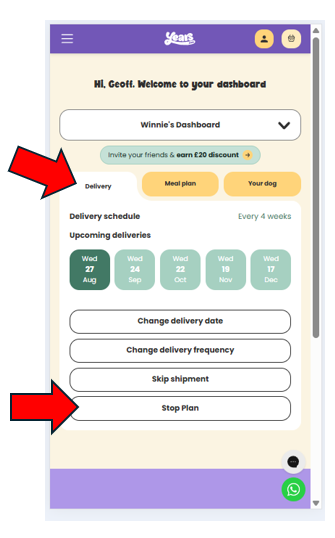
2. On a mobile or tablet, tap Delivery then select Stop Plan.
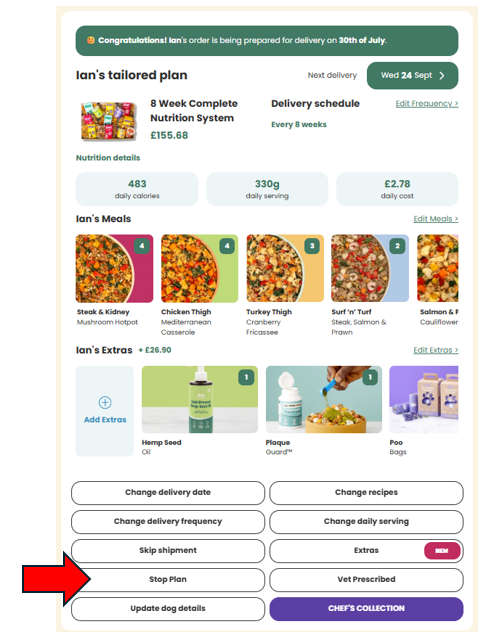
On a laptop you’re already in the right place — just select Stop Plan.
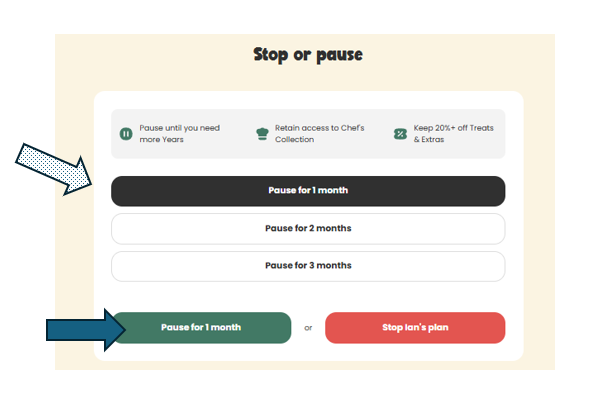
3. Choose how long you want to pause for.
4. Select “Pause for x months” at the bottom to confirm.
You can repeat these steps for each plan if you have more than one dog.
If you’d prefer a visual walkthrough, check out the step-by-step guide below
📱 On Mobile or Tablet
On a mobile or tablet, select Delivery then Stop Plan
💻 On a Laptop
On a PC/laptop or Mac, you’re already in the right place - just select Stop Plan.
Select how long you want to pause for (the shaded arrow) and then select the Pause button (the solid arrow)
If you have more than one dog, follow the above steps for each plan that you want to pause.
If you have any questions, please contact us.