
How to manage your Years accountUpdated 4 months ago
⚙️ Managing Your Years Account
You’re always in control with Years, everything can be managed from your account dashboard.
Step 1: Log In
Log into your account using the same email address you signed up with.
Step 2: Go to Your Dashboard
Once logged in, you’ll see your account dashboard where you can manage your dog’s plan.
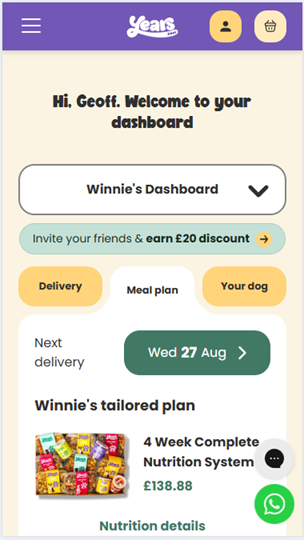
Step 3: Make Changes
From here, you can:
- Update your meal plan
- Change delivery dates
- Manage Extras
- Update address or payment details
- Pause or stop your plan
Need a quick tour of your dashboard?
These short videos walk you through everything⬇️
1. 📽️ Account overview for laptops and tablets
2. 📽️ Account overview for smart phones
Whether you're on the go or at your desk, managing your dog's meals has never been easier.